Free AI Pixel Art Generator
Type what you want and get retro pixel art. Sprites, icons and game scenes in 8 bit or 16 bit. No drawing, no app.
Free tokens when you sign up. No card needed.
Or start from an idea
- Knight sprite16 bit pixel art of a knight with a sword and a shield, side view, plain white background
- Forest level16 bit pixel art game level, a forest path with a small house and a river, side view
- Item icons8 bit pixel art icons of a gold coin, a red gem and a heart, plain black background
- Space game8 bit pixel art of a small rocket flying through stars, retro arcade game
How to make pixel art with AI
Three steps. It works on your phone too.
Step 1
Type your idea
Say what you want, like a knight with a sword.
Step 2
Pick a look
8 bit or 16 bit. A sprite, a scene or an icon.
Step 3
Make it and save it
Press Generate, then download. No watermark.
8 bit or 16 bit?
Two words in your prompt change the whole look.
8 bit
Big blocks and only a few colors, like old arcade games.
- Blocks
- 12 x 12
- Colors
Add to your prompt
8 bit pixel art
16 bit
Smaller blocks and more colors, so you see more detail.
- Blocks
- 30 x 30
- Colors
Add to your prompt
16 bit pixel art
The same coin, drawn on this page to show the difference.
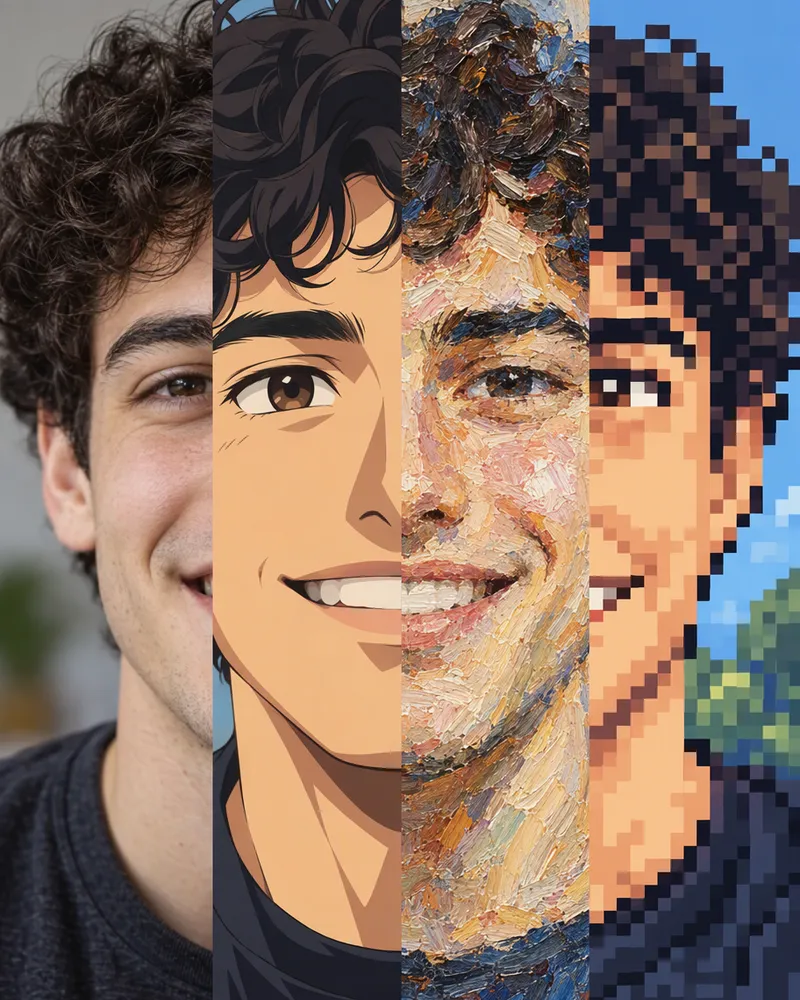
Turn your photo into pixel art
Use the Style button in the AI image editor.
- 1Upload your photo.
- 2Tap Style and pick Pixel Art.
- 3Press Generate and save it.
7 to 20tokens a photo
The price depends on the model you pick. Read more about the AI image editor.
Open the photo editorHow much does it cost?
You see the price before you make anything.
One picture, from
1token
Flux Red costs 1 token a picture. Most models cost more. Every model shows its price.
Free tokens when you sign up
New accounts get free tokens to try it. They work on every image model. No card needed.
Try it freeNo watermarkFailed pictures give your tokens back
More tools for your pixel art
Cut it out, try a style or make it move.
- BG remover
Cut your sprite out. 3 free a day.
- Text to image
3 free a day, no account.
- Styles and filters
Anime, painting and more.
- Image to video
Make your scene move.
Questions people ask
What is an AI pixel art generator?
It makes pixel art for you. Type what you want, like a knight with a sword, and the AI draws it in a retro pixel art look. You do not need to know how to draw.
Is the AI pixel art generator free?
You can try it for free. Sign up and you get free tokens, with no card needed. They work on every image model. One picture costs from 1 token, and the price depends on the model you pick. When your tokens run out, plans start at $19, paid one time. Yearly plans are 20% off.
Do I need an app or an account?
No app. It works online in your browser, on a phone or a computer. To make pixel art here you need a free account. With no account at all, the free image generator on our text to image page makes 3 pictures a day, and you can type a pixel art prompt there too.
How do I get the 8 bit or 16 bit look?
Say it in your prompt. Write 8 bit pixel art for big blocks and only a few colors, like old arcade games. Write 16 bit pixel art for smaller blocks and more colors. The buttons at the top of this page add these words for you.
What makes a good pixel art prompt?
Name one main thing first. Then say what it is doing and where it is. Then add the look, like 16 bit pixel art, and a plain background if you want a sprite. Short and clear is best.
Can I make sprites for my game?
Yes. Ask for one character or one item on a plain background, for example a knight with a sword, side view, plain white background. Then cut the background out with the background remover.
Is it real pixel art I can put straight into a game?
It looks like pixel art, but the AI makes a big picture, not a tiny 32 pixel sprite, and the blocks are not always on a perfect grid. For a game, shrink it to your sprite size in your art app with nearest neighbor scaling, so the pixels stay sharp.
Can I get a transparent background?
Not straight from the generator. Ask for a plain background in your prompt, then use our free background remover. It does 3 pictures a day with no account.
Can I turn my photo into pixel art?
Yes. Open the AI image editor, upload your photo, tap Style and pick Pixel Art. It costs 7 to 20 tokens, depending on the model you pick. It is AI, so check that the face still looks right before you share it.
Can I use my pixel art in a game or a shop?
Yes. You own what you make and can use it for personal or commercial work, like a game you sell or items in your shop. You are responsible for what you create and for any photo you upload. Read section 6 of the Terms for the exact words.
Is there a watermark?
No. You get the picture the AI makes, with nothing stamped on it.
Can I make my pixel art move?
Yes. Image to video turns your picture into a short clip, with your pixel art as the first frame. Video is not free. It is paid from your wallet, which starts at zero on a new account, and you see the price before you make one.
No account yet? Try a pixel art prompt on the free image generator, 3 pictures a day.
Make your first pixel art today
Type an idea, pick 8 bit or 16 bit, and save your picture.
Make pixel art