New Model · EA Video AI

Cinematic AI
Video Generator

Hollywood lighting · Director-level camera control · Native audio · Real-world physics.
Text to video and image to video — 5s · 10s · 15s · 1080p.

Text to VideoImage to VideoUp to 4 Reference Images16:9 · 9:16 · 4:3 · 3:4$1.12 for 5s

Examples

See what EA Video AI creates

Hover to play/pause or toggle audio. Every video generated with EA Video AI.

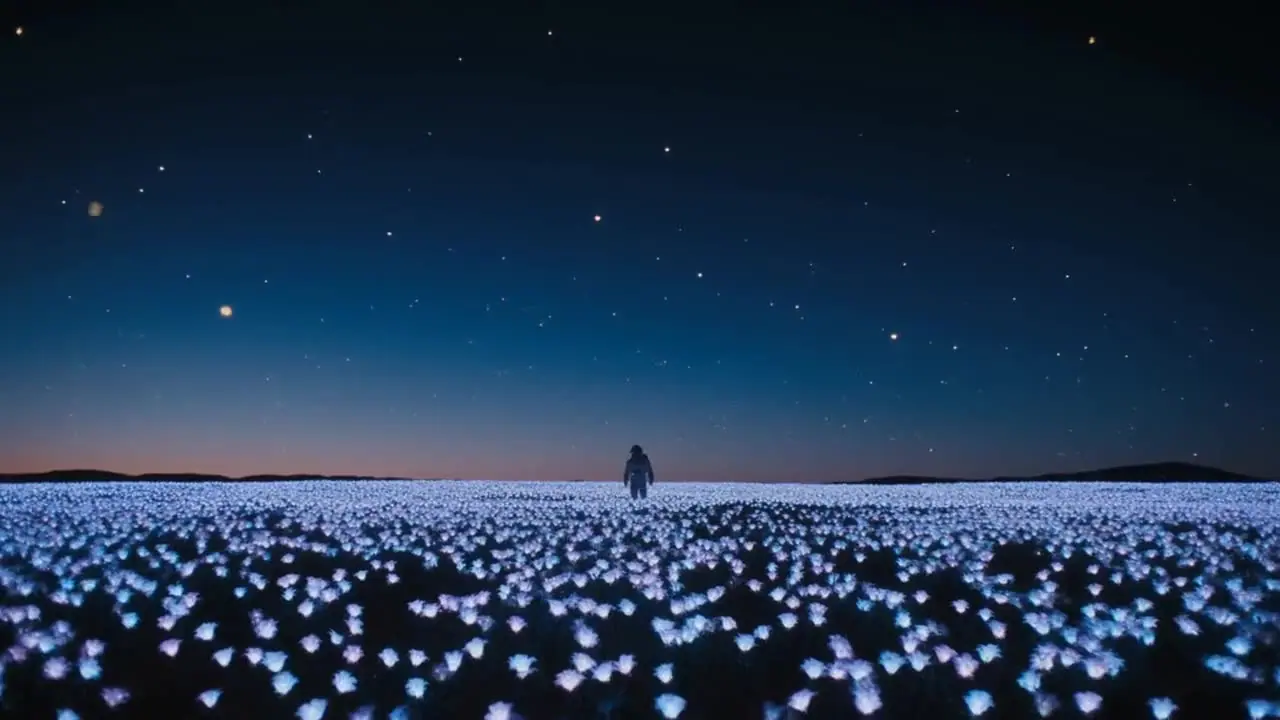
Astronaut on Mars

Text to Video · 16:9 · 15s

Tokyo Night Fashion

Text to Video · 16:9 · 10s

Mountain Drone Shot

Text to Video · 16:9 · 10s

Perfume Product Reveal

Image to Video · 9:16 · 5s

Cozy Coffee Shop

Text to Video · 16:9 · 5s

Aspect Ratios

One video, every format.

Generate in 16:9 for YouTube, 9:16 for Reels and TikTok, 4:3 or 3:4 — cinema-grade quality in every aspect ratio.

9:16Reels / TikTokEA Video AI
16:9YouTube / FilmEA Video AI
3:4PortraitEA Video AI
4:3ClassicEA Video AI
16:9WidescreenEA Video AI

Cinematic quality, every frame.

Hollywood lighting, professional color grading, and smooth motion — EA Video AI generates cinematic videos that don't look like AI. They look like film.

1080p
Cinema-grade quality
3 durations
5s · 10s · 15s
4 ratios
16:9 · 9:16 · 4:3 · 3:4
4 refs
Max reference images

Hollywood Lighting

Cinematic lighting setups — golden hour, studio, neon, natural — generated automatically from your prompt.

Professional Color Grading

Film-grade color science applied to every frame. Teal-orange, desaturated, warm, cool — EA Video AI reads your intent.

Smooth Motion

No jitter, no artifacts. Fluid camera movement and subject motion that looks like it was shot on a real camera.

Native Audio

EA Video AI generates synchronized audio — ambient sound, music, effects — natively with the video.

Director Camera Control

Describe camera moves in your prompt: dolly in, crane shot, handheld, rack focus — the model executes them.

Real-World Physics

Water flows, fabric moves, fire burns — EA Video AI simulates real-world physics for believable motion.

Text or image — same model.

Write a prompt for T2V, or upload up to 4 reference images for I2V. EA Video AI maintains character and style consistency across every frame.

Text to Video5 prompt examples
Cinematic Nature

Aerial drone shot of a misty mountain valley at golden hour, sun rays piercing through clouds, slow push forward, cinematic color grade, 16:9

Urban Night

Fashion model walking in slow motion through neon-lit Tokyo streets at night, rain reflections on pavement, shallow depth of field, film grain

Sci-Fi

Astronaut walking on Mars at sunset, red dust swirling around boots, wide establishing shot, cinematic lens flare, epic orchestral mood

Product

Luxury perfume bottle on black marble surface, studio lighting, slow 360 rotation, light refracting through glass, 9:16 portrait

Lifestyle

Cozy coffee shop interior, golden morning light streaming through windows, steam rising from cup, slow zoom in, warm color grade

Image to Video2 prompt examples
Character Animation

Animate the character walking forward, natural body movement, cinematic lighting, maintain exact appearance from reference image

Product Reveal

Slow rotation reveal of the product, studio lighting, subtle particle effects, maintain product colors and details from reference

Up to 4 reference images

Upload images for style, character, or product consistency across every frame.

Text to Video — Describe It, Watch It Come Alive

Write a prompt and EA Video AI generates a cinematic video with Hollywood-grade lighting, professional color grading, and smooth motion. No reference image needed — just your words. Perfect for filmmakers prototyping shots and agencies pitching concepts fast.

Text to Video — Describe It, Watch It Come Alive

Image to Video — Up to 4 Reference Images

Upload up to 4 reference images for style and character consistency. EA Video AI uses your references to maintain visual coherence across the entire video — same character, same style, same world. The same model handles both T2V and I2V seamlessly.

Image to Video — Up to 4 Reference Images

5s, 10s, or 15s — Choose Your Duration

Generate 5-second clips for social media, 10-second standard videos, or 15-second cinematic sequences. EA Video AI is priced at $1.12 for 5s, $2.24 for 10s, and $3.36 for 15s — pay only for what you generate, no subscription required.

5s, 10s, or 15s — Choose Your Duration
Frequently Asked Questions

Still have questions?

Frequently Asked Questions

Last updated: July 2025

EA Video AI: Cinematic AI Video Generator — Text to Video & Image to Video

EA Video AI is a cinematic AI video generator on EnhanceAI Videoground. It generates film-quality videos with Hollywood lighting, professional color grading, and smooth motion from text prompts and optional reference images — in 5 seconds, 10 seconds, or 15 seconds, across four aspect ratios: 16:9, 9:16, 4:3, and 3:4. No subscription required — pay per generation starting at $1.12.

What Is EA Video AI?

EA Video AI is EnhanceAI's flagship cinematic video generation model. Unlike typical AI video generators that produce obvious AI artifacts, EA Video AI is purpose-built for film-quality output — Hollywood lighting, professional color grading, and smooth cinematic motion that looks like it was shot on a real camera, not generated by an algorithm.

The model handles both text-to-video (T2V) and image-to-video (I2V) in a single unified model. Add up to 4 reference images for style and character consistency, or generate purely from a text prompt. Available now on EnhanceAI Videoground — no waitlist, no subscription.

EA Video AI Specs

  • Duration: 5s · 10s · 15s
  • Aspect ratios: 16:9 · 9:16 · 4:3 · 3:4
  • Modes: Text-to-Video (T2V) and Image-to-Video (I2V)
  • Reference images: Up to 4 for style and character consistency
  • Output format: MP4
  • Quality: Cinema-grade — Hollywood lighting, professional color grading
  • Pricing: Pay-per-generation, no subscription

EA Video AI Pricing

EA Video AI uses transparent pay-per-generation pricing. No monthly subscription, no hidden fees — top up your wallet and pay only for what you generate.

DurationPriceBest For
5 seconds$1.12Social media clips, ads, product reveals
10 seconds$2.24Standard content, brand videos, promos
15 seconds$3.36Cinematic sequences, film prototypes, storytelling

Key Features of EA Video AI

1. Cinema-Grade Quality

EA Video AI is built for film-quality output. Every video features Hollywood-grade lighting, professional color grading, and smooth cinematic motion. The result is AI video that doesn't look like AI video — it looks like it was shot on a real camera by a real cinematographer.

  • Hollywood-grade lighting and shadow rendering
  • Professional color grading and tone mapping
  • Smooth, natural camera motion
  • Cinematic depth of field and atmosphere

2. Text to Video (T2V)

Write a prompt and EA Video AI generates a cinematic video. Describe the scene, style, lighting, and motion — the model renders it with film-quality output. No reference image required. Use the built-in Magic Prompt button to enhance your prompt with AI automatically.

3. Image to Video (I2V) with Up to 4 Reference Images

Upload up to 4 reference images for style and character consistency. EA Video AI uses your references to maintain visual coherence throughout the video — same character design, same visual style, same world. Ideal for brand content, character animation, and style-consistent video series.

  • Character consistency across the entire video
  • Style reference for visual tone and aesthetic
  • Up to 4 reference images per generation
  • Same model handles T2V and I2V — no switching

4. Four Aspect Ratios

  • 16:9 — YouTube, film, presentations, widescreen
  • 9:16 — Instagram Reels, TikTok, YouTube Shorts, Stories
  • 4:3 — Classic TV format, retro aesthetic
  • 3:4 — Portrait format for mobile-first content

EA Video AI Prompt Examples

Use these prompt examples as a starting point. The more specific your prompt, the better the cinematic output:

  • "A lone astronaut walking on Mars at sunset, cinematic wide shot, dramatic orange sky, dust particles in the air, slow motion, 16:9"
  • "A fashion model walking in slow motion on a rain-soaked Tokyo street at night, neon reflections, shallow depth of field, editorial style"
  • "An aerial drone shot over a misty mountain valley at sunrise, golden hour light, cinematic color grade, smooth camera push forward"
  • "A luxury perfume bottle product reveal on black marble, dramatic studio lighting, close-up macro shot, slow rotation, 9:16"
  • "A cozy coffee shop interior, warm golden light, steam rising from a cup, shallow focus, slow zoom in, cinematic atmosphere"

Pro tip: Always specify lighting style, camera movement, and aspect ratio in your prompt for best results.

How To Use EA Video AI

Step 1: Open Videoground

Go to EnhanceAI Videoground and select EA Video from the model selector.

Step 2: Write Your Prompt

Describe your video in detail. Use the Magic Prompt button to enhance your prompt with AI. Add up to 4 reference images if you need style or character consistency.

Step 3: Choose Duration & Aspect Ratio

Select 5s, 10s, or 15s. Choose your aspect ratio — 16:9, 9:16, 4:3, or 3:4. Click Generate and your cinematic video will be queued.

Step 4: Download, Upscale & Add Audio

Your video appears in the preview panel when ready. Download as MP4, or use the built-in AI Video Upscaler and Add Audio features for further enhancement.

Who Is EA Video AI For?

  • Filmmakers — Prototype shots and sequences before production without a full crew
  • Ad agencies — Pitch cinematic concepts to clients in hours, not weeks
  • Content creators — Generate premium video content for YouTube, Reels, and TikTok
  • E-commerce brands — Create product showcase videos with consistent brand style
  • Educators — Produce engaging visual content for courses and presentations
  • Anyone — Who's been waiting for AI video to actually look good

EA Video AI vs Other AI Video Generators

EA Video AI vs Sora

Sora has limited access and high pricing. EA Video AI is available now on EnhanceAI with transparent per-generation pricing, four aspect ratios, and up to 4 reference images — no waitlist, no subscription.

EA Video AI vs Kling

Kling produces good quality video but lacks the cinematic color grading pipeline of EA Video AI. EA Video AI is purpose-built for film-quality output with Hollywood lighting that doesn't look like AI.

EA Video AI vs Runway

Runway requires a monthly subscription. EA Video AI uses pay-per-generation pricing — $1.12 for 5s, $2.24 for 10s, $3.36 for 15s — with no monthly commitment. Also explore other AI video generators on EnhanceAI.

Tips for Better EA Video AI Results

  • Specify lighting style — "golden hour", "dramatic studio lighting", "neon night"
  • Describe camera movement — "slow zoom in", "drone shot", "tracking shot", "static wide"
  • Mention mood and atmosphere — "cinematic", "moody", "editorial", "documentary"
  • Use reference images for character or brand consistency across multiple videos
  • Use the Magic Prompt button to automatically expand simple prompts into detailed cinematic descriptions
  • Choose 15s duration for storytelling sequences and 5s for social media hooks

Start Generating with EA Video AI

EA Video AI is available now on EnhanceAI Videoground. Generate cinematic AI videos in 5s, 10s, or 15s across four aspect ratios — from text or images. Pay per generation, no subscription required.

Also explore Seedream 5 Lite for 4K AI image generation, AI text-to-video tools, and the AI video upscaler to enhance your outputs.

Visit EnhanceAI Videoground to try EA Video AI today.