Nano Banana 2.1 Google's newest image model is live. Make pictures from text or edit with up to 14 photos.
Try itAI Motion Control for Dance Videos
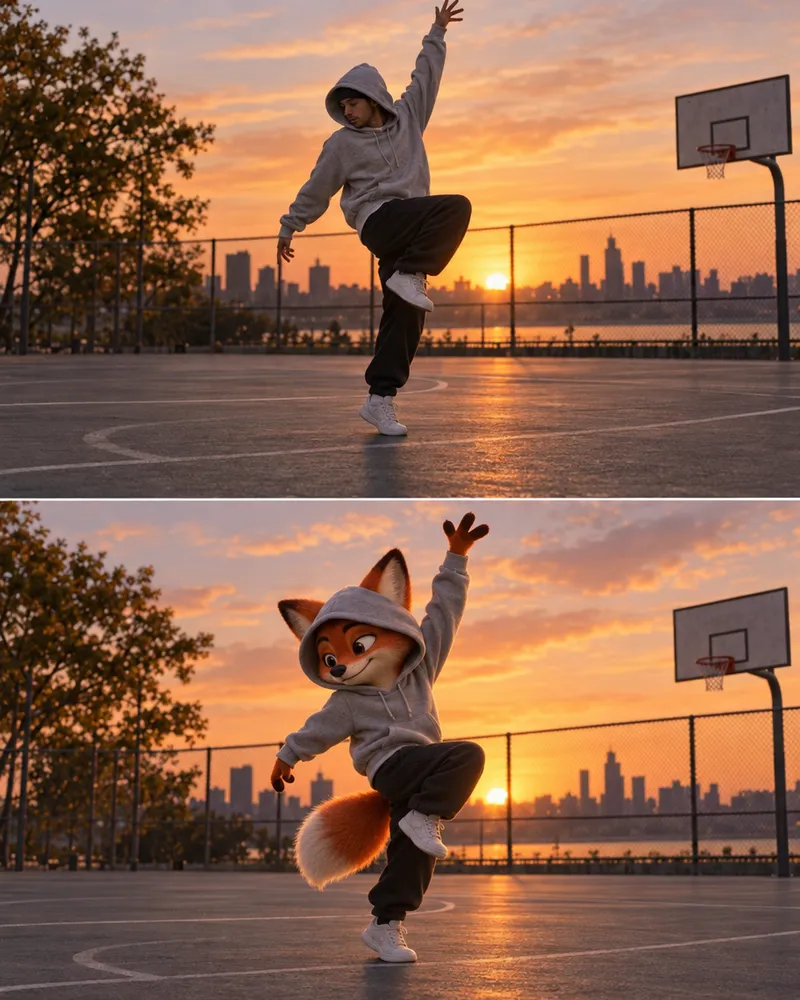
Add a photo of your character and a video of someone dancing. The AI makes your character do the same moves.
- No app needed
- Price shown before you pay
- Pay per video, no plan needed
How to make a motion control video
Three steps. It works on your phone too.
- Add photo
Step 1
Add your photo
One person or character, whole body in view.
- Add video
Step 2
Add a dance video
The moves come from here. MP4 or MOV, up to 100MB.
- Download
Step 3
Get your video
Your character does the same moves. Download and share.
Pick a motion control model
The price follows how long your video is. You see it before you pay.
| Model | 5 second video | 10 second video |
|---|---|---|
| Kling V2.6 MotionCan keep your video's sound |
|
|
| Kling V2.6 Pro MotionKling's Pro model |
|
|
| Steady DancerMade for dance |
|
|
| SCAIL Motion PoseFlips and turns |
|
|
| LTX Video 2 ControlUp to 1080p. Photo optional |
|
|
Kling V2.6 MotionCan keep your video's sound
- 5 second video
- $0.70
- 10 second video
- $1.40
Kling V2.6 Pro MotionKling's Pro model
- 5 second video
- $1.12
- 10 second video
- $2.24
Steady DancerMade for dance
- 5 second video
- 480p$0.40
- 720p$0.80
- 10 second video
- 480p$0.80
- 720p$1.60
SCAIL Motion PoseFlips and turns
- 5 second video
- 480p$0.40
- 720p$0.80
- 10 second video
- 480p$0.80
- 720p$1.60
LTX Video 2 ControlUp to 1080p. Photo optional
- 5 second video
- 480p$0.30
- 720p$0.40
- 1080p$0.60
- 10 second video
- 480p$0.60
- 720p$0.80
- 1080p$1.20
Tips for the best video
A clear photo and a clear video give the best moves.
Good Cut off Whole body in view
Show the arms and legs, not just the face.
Good Blurry Steady video
Hold the camera still while the person dances.
Good Too dark Good light
Daylight or a bright room works best.
Good Too small Big in the frame
Stand close enough that the body fills the video.
How you pay
You pay for each video you make. No subscription.
A 5 second video
$0.30and up
On LTX Video 2 Control at 480p. Longer or sharper videos cost more.
Free tokens to start
New accounts get free tokens, no card needed. Use them on any image model to make your character. They do not pay for video.
Make a characterTop up for video
$5to start
Video is paid from your wallet. No plan needed. If a video fails, the money goes back.
See plansMore video tools





Questions people ask
What is AI motion control?
You give the AI two things: a photo of a character and a video of someone moving. It makes a new video where your character does the same moves. People use it for dance videos, reels and fun clips of cartoon characters.
How do I make an AI dance video?
Open the Motion tab in the video studio. Add a photo of your character, add a dance video, pick a model and press Generate. The price shows on the button before you pay.
Is motion control free?
No. Video is never free on Enhance AI. Each video is paid from your wallet, and a new account starts with $0 in it. Top ups start at $5. The free tokens you get when you sign up work on image models, so you can make your character photo for free.
How much does one video cost?
It depends on the model and on how long your dance video is. A longer video costs more. The lowest price is $0.30 for 5 seconds on LTX Video 2 Control at 480p. A 10 second video on Kling V2.6 Motion is $1.40. You see the exact price before you pay. If a video fails, the money goes back to your wallet.
Is this Kling motion control?
Yes. Kling V2.6 Motion and Kling V2.6 Pro Motion are two of the models in the Motion tab. You can also pick Steady Dancer, made for dance, SCAIL Motion Pose, made for flips and turns, and LTX Video 2 Control, which goes up to 1080p.
What photo works best?
One person or one character, with the whole body in view, in good light. A real person or a cartoon character both work. If the photo shows only a face, the AI has to guess the rest of the body.
What video can I upload?
An MP4 or MOV video of one person moving, up to 100MB. A steady camera and a clear view of the arms and legs give the best result.
Can I add a text prompt?
Yes. The moves come from your video. A short prompt can describe the look or the scene. The Kling models also let you list things you do not want to see.
Will my video keep its music?
On the Kling models you can keep the sound from your dance video, and it is on by default. LTX Video 2 Control can keep the sound, make new sound, or leave the video silent.
Where do I find my video?
It is made in the background. When it is ready it shows in your history. Videos are kept there for 15 days, so download the ones you want to keep.
Can I post the videos on Instagram or YouTube?
Yes. You own the videos you make and can use them for personal or commercial work, like posts, ads and client projects. Only upload photos and videos you have the right to use, and do not use someone's face without their permission.
Do I need an app?
No. It works online, in the browser on your phone or computer.
Make your character dance
Add a photo and a dance video. See the price before you pay.
Make my video- No app needed
- No subscription
More from Enhance AI