CapCut Alternative with AI Video
CapCut edits the videos you already have. Enhance AI makes new ones. Type an idea or add a photo, and get a video.
- Text or photo to video
- Top video models in one place
- No app needed
- No watermark
Prompt
Try this promptA low drone shot flies over turquoise waves toward a rocky island with a small white lighthouse, sea spray glowing in golden sunset light.
Kling V3 · 5 seconds
How to make a video without filming
Three steps. It works on your phone too.
Step 1
Type your idea
Say what you want to see. Or add a photo to start from.
Step 2
Pick a model
Each model has its own look. The price shows before you start.
Step 3
Put your clips in order
Your clips land on a timeline. Trim them and download one video.


Make clips you never filmed
From a few words, from a photo, or by making a clip longer. Each card shows the model and the prompt that made it.

From words · Kling V3 · 5 seconds
“A red fox trots through fresh snow in a quiet birch forest while snowflakes fall, the camera tracks alongside it at ground level, soft blue winter light.”
Try this prompt

From a photo · Veo 3.1 Reference · 8 seconds
“The man from the reference image plays a plain wooden acoustic guitar on a rooftop at golden hour, eyes half closed as he strums, the city softly blurred behind him, slow push in.”
Try this prompt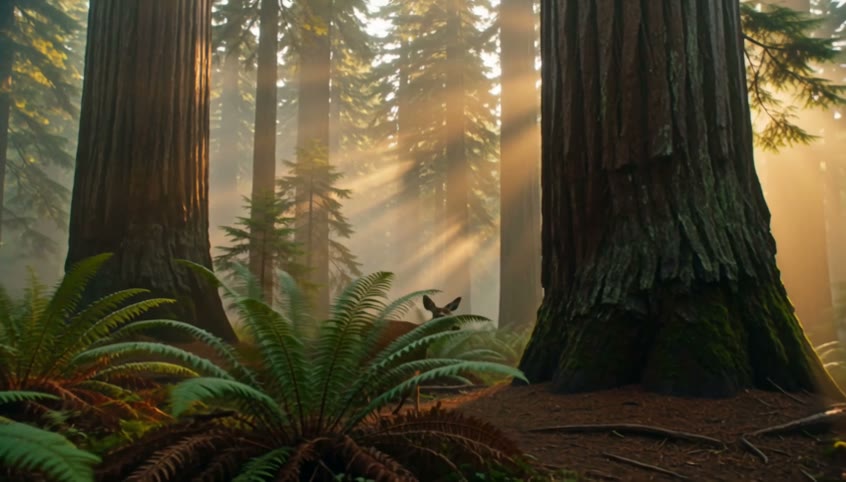
Made longer · WAN 3.0 Extend · 10 seconds
“Continue this shot. The deer walks slowly along the trail, stops to look back, then steps into the ferns as the sun rays shift through the trees.”
Make a clip longer
From words · MiniMax H3 Max · 6 seconds
“A red hot air balloon drifting over patchwork farmland, long morning shadows, a flock of birds crossing below. Slow dolly push in, misty dawn light, desaturated greens…”
Try this prompt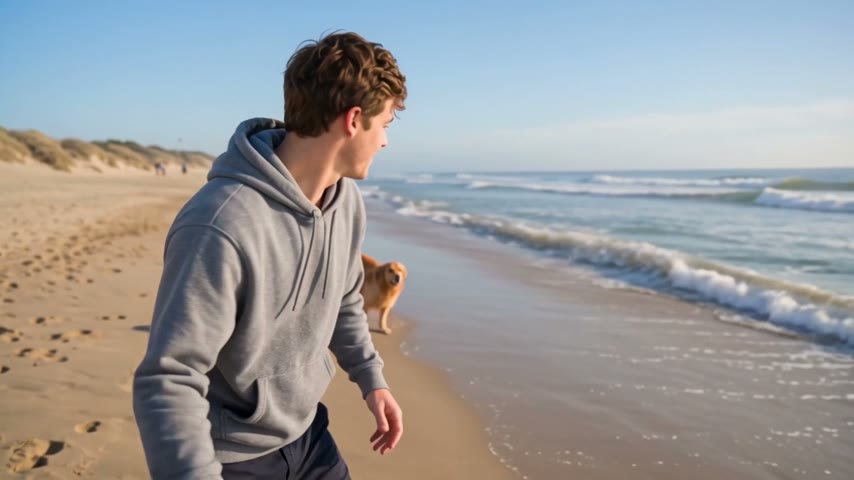


From a photo · WAN 3.0 Reference · 5 seconds
“The man in Image 1 throws a red ball along a sandy beach and the golden retriever in Image 2 races after it through the shallow waves, bright morning light, handheld camera.”
Try this prompt
Made longer · WAN 3.0 Extend · 10 seconds
“Continue this shot. The flock of flamingos circles low over the pink lake and lands in the shallow water, sending ripples across the reflections.”
Make a clip longer
CapCut vs Enhance AI
They do different jobs. Here is which one to use.
| You want to | Use | Why |
|---|---|---|
| Cut and join clips you filmed | CapCut | It is a video editor made for this. |
| Add captions and transitions to your video | CapCut | Its editor has these built in. |
| Make a new video from a few words | Enhance AI | Kling, Veo, Seedance and more make the clip. |
| Turn a photo into a video | Enhance AI | Add a photo and say what should happen. |
| Make music or a voiceover | Enhance AI | The music and speech tools make them from text. |
| Put AI clips into a longer edit | Both | Make the clips here, then edit them in CapCut. |
Cut and join clips you filmed
- Use
- CapCut
- Why
- It is a video editor made for this.
Add captions and transitions to your video
- Use
- CapCut
- Why
- Its editor has these built in.
Make a new video from a few words
- Use
- Enhance AI
- Why
- Kling, Veo, Seedance and more make the clip.
Turn a photo into a video
- Use
- Enhance AI
- Why
- Add a photo and say what should happen.
Make music or a voiceover
- Use
- Enhance AI
- Why
- The music and speech tools make them from text.
Put AI clips into a longer edit
- Use
- Both
- Why
- Make the clips here, then edit them in CapCut.
More video tools
All in the same account, in your browser.
- Text to video
Turn a few words into a video
- Image to video
Make a photo move
- Edit a video
Change a video with a few words
- Reels
Turn photos and music into a Reel
- Remove video background
Cut the person out of a video
- Upscale video
Make a soft clip sharp
- Dubbing
Make your video speak another language
- Music
Make a song or a background track









How much does it cost?
You pay for each video from your wallet. You see the price before you start.
One 5 second Kling V3 clip
$0.84a clip
Other models cost more or less. The Generate button always shows the price.
Free tokens when you sign up
Use them on image, music and voice tools. Videos are paid from your wallet. No card needed.
Sign up freeAdd money to your wallet
$5to start
Pay only for the videos you make. No subscription. Token plans for image, music and voice start at $19, paid one time.
See plansPrice shown before you startMoney back if a video failsNo watermark
Questions people ask
Is Enhance AI a good CapCut alternative?
Yes, if you want AI to make the video for you. CapCut is a video editor: you bring clips you filmed and cut them together. Enhance AI makes new clips from a few words or a photo, with all the top video models in one place, like Kling, Veo and Seedance. Many people use both: make the clips on Enhance AI, then finish them in their editor.
What is the difference between Enhance AI and CapCut?
CapCut is built for editing footage you already have: trimming, transitions, captions and effects. Enhance AI is built for making new media with AI: video, images, music and voice, all from a prompt.
Can Enhance AI make a video from text?
Yes. Type what you want to see, pick a model and press Generate. You can also start from a photo, and the person or pet in it can star in a new scene.
Can I edit videos on Enhance AI like in CapCut?
Only simple things. The clips you make land on a timeline in the video studio. You can drag them into order, trim them and download them as one video. There are AI tools too: change a video with words, make a clip longer, remove the background, upscale it or dub it into another language. For detailed editing with captions and effects, a full video editor like CapCut still does more.
Is video free on Enhance AI?
No. Making an account is free and needs no card. But every video is paid from your wallet, and a new wallet starts empty. The free tokens you get when you sign up are for the image, music and voice tools, not for video.
How much does one video cost?
It depends on the model, the length and the quality. The Generate button shows the exact price before you press it. Nothing is charged until you do. If a video fails, the money goes back to your wallet on its own.
Do I need a subscription?
No. Add money to your wallet from $5 and pay for each video you make. Plans are optional one time payments from $19, and yearly plans are 20% off. Plans add tokens for image, music and voice tools, not money for video.
Can I make music and a voiceover too?
Yes. The music tool makes a song or background track from a prompt, and the speech tool turns your text into a voice. Both use tokens, so you can try them with the free tokens you get when you sign up.
Do I need to download an app?
No. Enhance AI works online, in the browser on your phone or computer.
Is there a watermark on my video?
No. Enhance AI does not add a watermark to the videos you make.
How long are my videos kept?
Finished videos stay in your studio history for 15 days, then they are deleted. Download the ones you want to keep.
Can I post my videos on YouTube or Instagram?
Yes. You own what you make and can use it for personal or commercial work, like ads and client videos. You are responsible for what you put in and what you post, so read the Terms and the rules of the site you post on.
Make your first AI video
Type an idea, pick a model and see the price before you start.
Make a video- Top video models in one place
- No app needed
- No watermark

More from Enhance AI